
event
news / 29th Aug 2023
Enhanced Workforce eXperience: Sage People Update
Sage People recently announced enhancements to the Workforce eXperience (WX) user interface to improve the employee experience whilst delivering a more modern and user-friendly look and feel. The ‘WX 2.0’ improvements will be rolled out to all customers over upcoming releases, with the legacy interface being depreciated in 2024.
The updated WX portal, introduced in an earlier release, provides an improved navigation experience with a modern, responsive layout designed to work seamlessly on all devices. When enabled for your organisation, you will notice some differences between the new layout and the old interface.
Updates and Enhancements
The latest announcement (release Y23.3) provides additional updates and enhancements to the new WX portal, which include a new homepage and service page layout with enhanced widgets for Internal Communications and Summaries. The list of updates is summarised below: i.e.
-
- New homepage and service page components:
- A carousel view for internal communications.
- New page sections that display summary processes.
- A setting on the HCM Configure page to enable or disable the new-look homepage and service page.
- A new policy setting to enable or disable the new-look homepage and service page by policy.
- New fields on the New Service/Edit Service page to define titles and subtitles for the new homepage.
- Resolved issues, styling, and navigation improvements.
- New homepage and service page components:
New Design
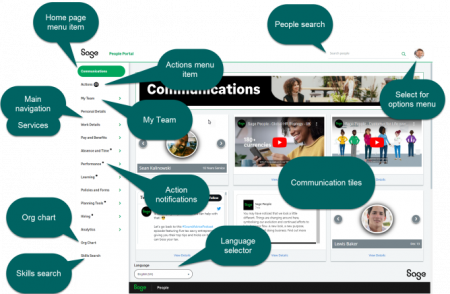
The new design incorporates a refreshed menu, header, and footer, along with a new people search function enabling you to search for team members across your organisation. The design consolidates the previous top and left navigation into a streamlined left menu for efficient access to all WX features. A new profile view has been introduced when viewing other team members, and managers gain a My Team view for streamlined management tasks and direct report oversight. Further updated components will be made available in future releases.
Activation
The improved navigation and homepage are available in the current Y23.3 release but have been disabled by default. Activation, at organisational or policy level, requires manual enablement using the Updated WX Navigation setting on the HCM Configure page.
You can activate the new navigation for your entire organisation or a selected subset of users through specific policies. Once enabled at a particular level, the new navigation becomes accessible to all users within that level. For example:
- Enable the setting at the organisation level to switch on the new navigation for all users, regardless of their policy setting.
- Enable the setting for a policy assigned to an HR Department to switch on the new navigation for all users in that department.
- Enable the setting for a policy to switch on the new navigation for all users in that policy.
The new WX homepage widgets can be enabled using the Updated WX Homepage setting at either the organisation or policy level. This setting enables a modernised look for processes displayed on the homepage and service pages. This only applies to users of the updated WX when the Updated WX Navigation setting is enabled for the organisation or by policy.
Planned roll-out schedule:
Y23.4 (Beginning October 2023)
The updated WX navigation menu will be enabled by default for all customers as part of the Y23.4 upgrade. You will be able to manually disable it until the Y24.1 release.
Y24.1*
Legacy WX navigation will be deprecated as part of the Y24.1 upgrade, and the Updated WX Navigation toggle will be removed. The new WX2.0 navigation will be fully implemented for all customers with this release.
Y24.2*
The legacy WX homepage will be deprecated as part of the Y24.2 upgrade, and the Updated WX Homepage toggle will be removed. The new WX 2.0 homepage functionality will be fully implemented for all customers with this release.
*Note that the timing of the Y24.1 and Y24.2 releases is to be determined and communicated by Sage in due course.
Help is at hand
If you require more information or support in adopting this new WX functionality, please reach out on +44(0)1908 030360 or info@tugelapeople.com. Alternatively, complete the ‘Get in touch’ form, and a member of our Sage People Managed Services team will gladly help.
news / 22nd Jan 2026
Celebrating 14 Years of HRIS & Payroll Expertise
View newscase study
Vitrolife & Tugela People: Simplifying Complexity
View case studycase study
Optimising Commission Management in Sage People
View case studynews / 29th Jul 2025
From Road Trips to APIs: Sage People Payroll
View newscase study
Culture Amp & Sage People: HR Automation Insights
View case studycase study
Aventum’s Journey to a Modern HRIS Solution
View case studynews / 14th Nov 2024
Sage People 24.2: Enhancing Employee & Manager Experience
View news
Make an enquiry
Let’s talk
Your people. Your potential
Our international team of expert consultants has over 50 years of collective experience and multi-system HR knowledge.
Get in touch to find out how we can help your organisation thrive.
01908 030360
info@tugelapeople.com
C/O Impact HR, Goldline Building Lamport Close, Kettering Venture Park, Kettering, England, NN15 6XY
Milton Keynes Office: 314 Midsummer Court, Midsummer Boulevard, Milton Keynes, MK9 2UB