
news / 22nd Jan 2026
news / 12th Sep 2022
How to Add the New Bank Holiday in Sage People HRIS
New Bank holiday announcement in the UK in 2023
Further to the announcement in September of an additional bank holiday for the state funeral of the Her Majesty Queen Elizabeth II’s State Funeral, the government has now announced an additional bank holiday to mark the coronation of His Majesty King Charles III.
The bank holiday will fall on Monday, 8 May 2023, following the Coronation on Saturday, 6 May 2023.
This bank holiday will operate in the same way as other bank holidays, and there is no statutory entitlement to time off. However, employers may include bank holidays as part of a worker’s leave entitlement.
The bank holiday will take place across the United Kingdom.
Click here for more information
How to process this change in Sage People
If you are running the Sage People HRIS, you need to accommodate the change to this day in your system, then please follow the steps below:
Locate your relevant Work Day Patterns that contain your UK Public Holidays, and click the “Holidays” tab.
Then, click the “New” button in the top right corner of the screen:
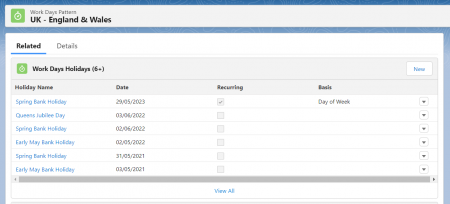
Enter details as follows:
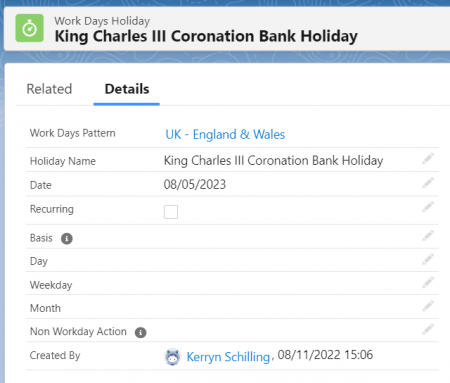
This is a one-off public holiday, so we do not need to check the “Recurring” field.
We also need to consider existing absences booked over 8 May 2023. When the absence was first booked, the system calculated how many days/hours the period of absence was, given the public holidays entered at the time. The absence record does not recalculate when the new public holiday has been entered.
To find affected records, create a new formula (checkbox) field on the absence object:
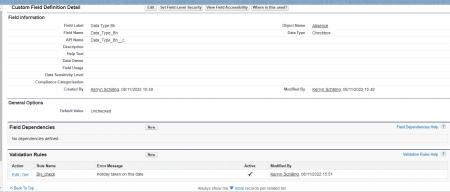
Formula to copy: IF(DATE(2023,5,08) >= fHCM2__Start_Date__c && DATE(2023,5,08) <= fHCM2__End_Date__c ,TRUE,FALSE)
Create a new report based on an “Absences” report type. Here we’ve used the standard “Employment History with Absences” report type.
Bring in the newly created field and add a filter as follows:
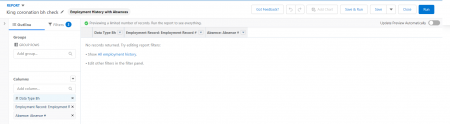
You may also want to bring in additional fields such as “Absence #” to locate the record easily, “Start Date”, “End Date” and the new “Date check field”.
Additionally, you may wish to bring in further filters for those on UK HR Departments, Policies or Work Day Patterns so you know whose records meet the criteria.
The records that now appear will need their days/hours value manually amended directly on the absence record.
For further Support
If you have any questions or would like support on any of the above, please feel free to reach out to the Tugela People Managed Services team at support@tugelapeople.com
case study
Vitrolife & Tugela People: Simplifying Complexity
View case studycase study
Optimising Commission Management in Sage People
View case studynews / 29th Jul 2025
From Road Trips to APIs: Sage People Payroll
View newscase study
Culture Amp & Sage People: HR Automation Insights
View case studycase study
Aventum’s Journey to a Modern HRIS Solution
View case studynews / 14th Nov 2024
Sage People 24.2: Enhancing Employee & Manager Experience
View newsnews / 6th Aug 2024
Sage People Y24.2: Key Updates and Impacts
View news
Make an enquiry
Let’s talk
Your people. Your potential
Our international team of expert consultants has over 50 years of collective experience and multi-system HR knowledge.
Get in touch to find out how we can help your organisation thrive.
01908 030360
info@tugelapeople.com
C/O Impact HR, Goldline Building Lamport Close, Kettering Venture Park, Kettering, England, NN15 6XY
Milton Keynes Office: 314 Midsummer Court, Midsummer Boulevard, Milton Keynes, MK9 2UB